// 01
Server health & mail-stack status
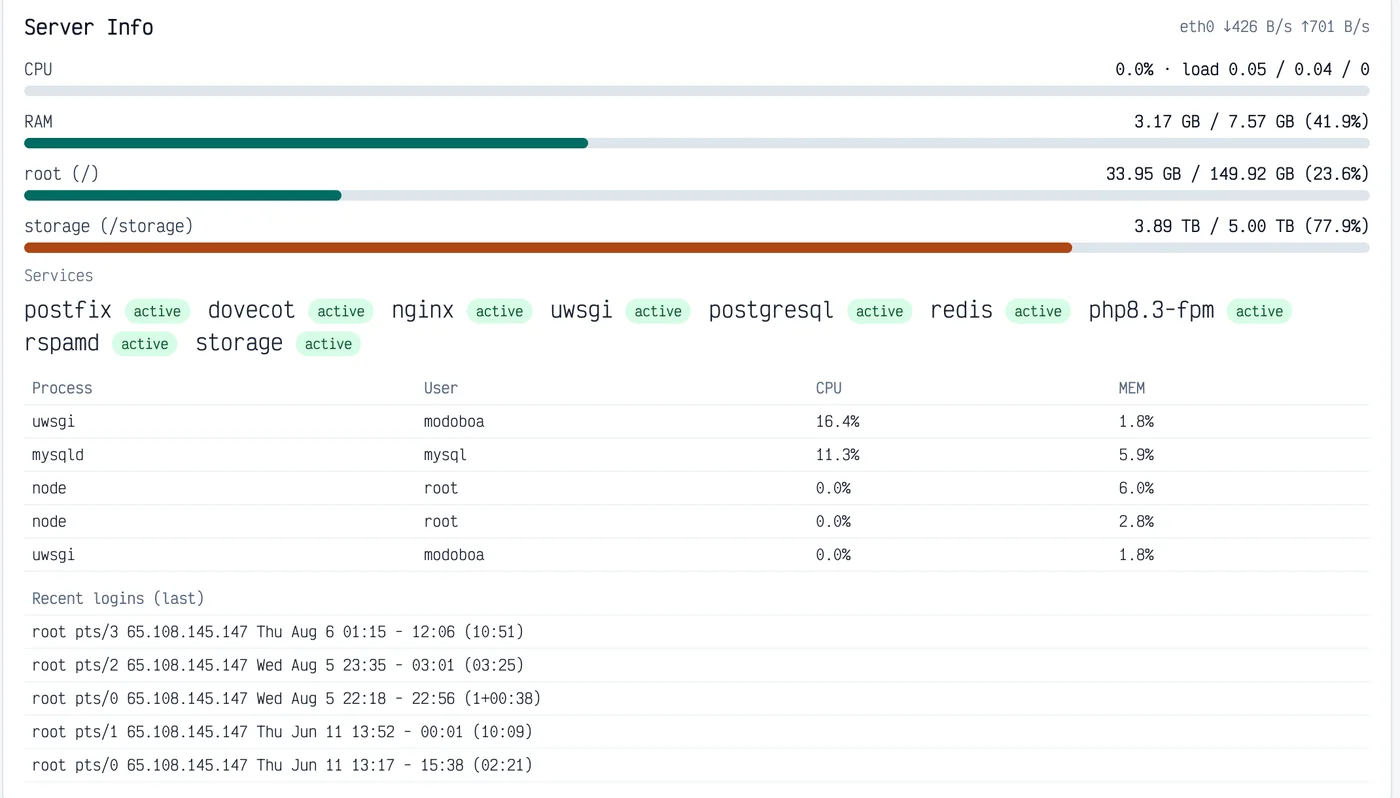
CPU, memory, disk and network at a glance, plus live status for Postfix, Dovecot, Rspamd and the rest of the stack — without leaving Modoboa for a separate monitoring tool.


Server observability, mailbox operations intelligence and advanced delivery troubleshooting — integrated into Modoboa.
// 01
MailOps extends Modoboa with host-level monitoring, at-a-glance mailbox and domain analytics, and message-specific diagnostics that help administrators understand why delivery failed and what to fix.
Apogee MailOps is an operations and troubleshooting extension for Modoboa. It brings infrastructure health, mailbox usage and delivery diagnostics into the same administration environment used to manage domains and accounts.
Instead of replacing Modoboa’s native administration features, MailOps builds on them. It exposes operational information that is otherwise spread across the operating system, mail services, account views and logs, and turns it into concise, administrator-focused views.
The result is a faster path from “something is wrong” to “this is the cause and this is what needs to change” — whether the issue is server capacity, a stale mailbox, a migration state or a message rejected by a remote provider.
Apogee MailOps adds server observability, mailbox operations intelligence and advanced email-delivery troubleshooting to Modoboa. Monitor the health of the mail server, understand storage and account activity, and turn failed deliveries into actionable SMTP, SPF, DKIM and DMARC diagnostics.
// 02
// 03
The following features represent MailOps functionality or operational workflows that are not provided by vanilla Modoboa in the same integrated, administrator-focused form.
Monitor CPU utilisation, system load, RAM, network throughput and filesystem usage directly from the Modoboa administration environment.
See the current status of critical mail-server components such as Postfix, Dovecot, Rspamd, Nginx, uWSGI, PostgreSQL, Redis and supporting services.
Surface resource-heavy processes and recent operating-system or SSH logins to provide immediate operational and security context.
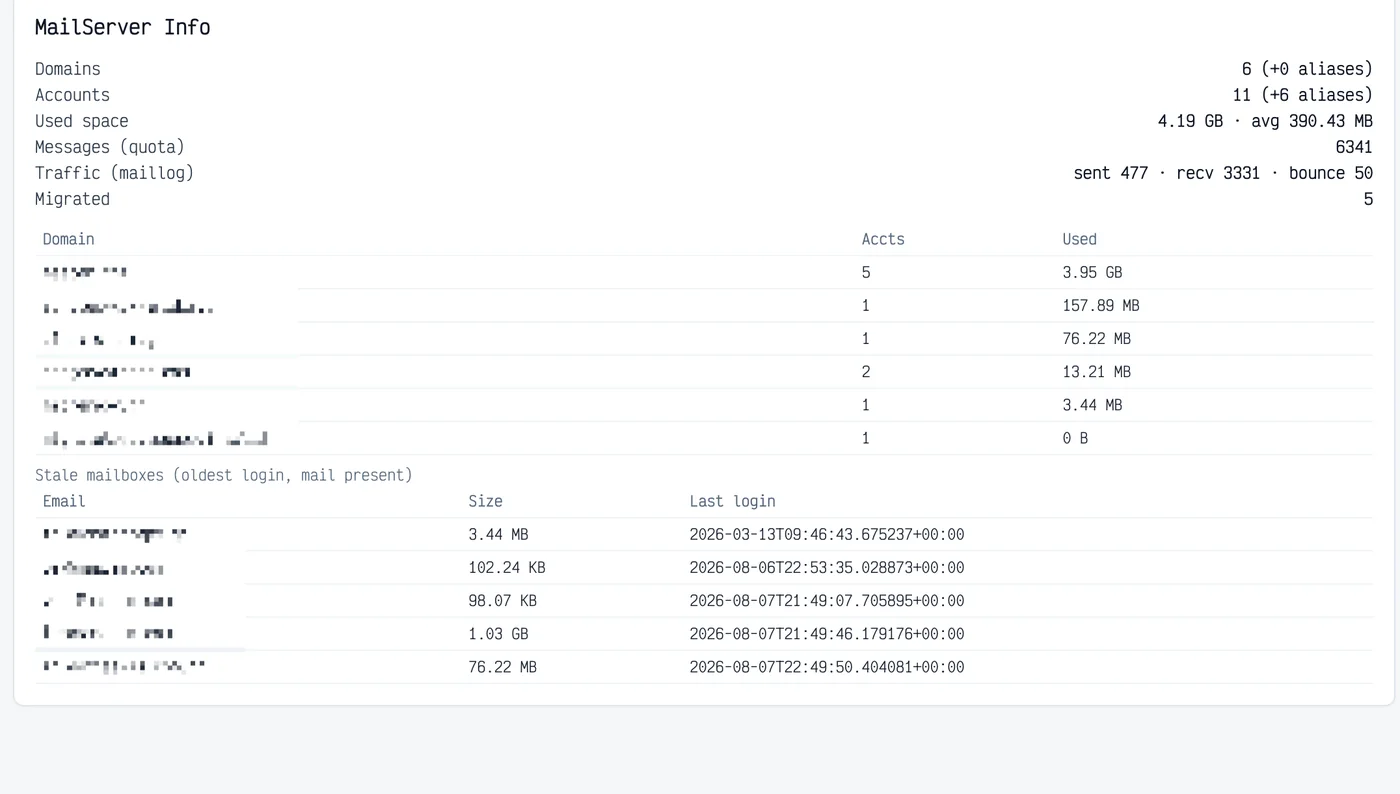
View domains, accounts, actual mail storage, message activity, bounces and migration state in one concise server-level overview.
See actual used storage by domain and mailbox, together with per-mailbox message counts, without opening individual accounts or interpreting quota percentages.
Identify mailboxes that still contain mail but have not been accessed recently, combining mailbox size, mail presence and last-login information in one actionable report.
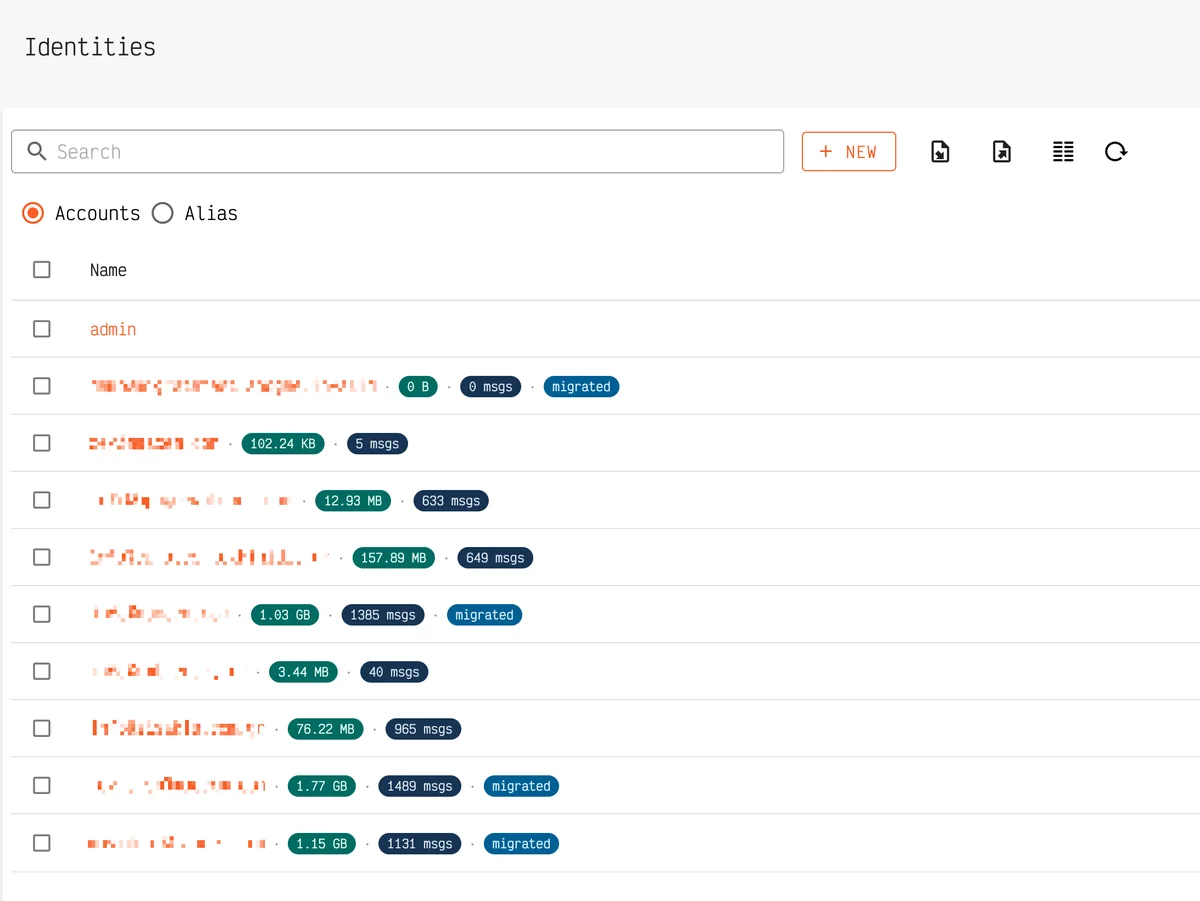
Surface completed migration state directly in normal account views and server summaries, instead of relying only on a separate migration workflow.
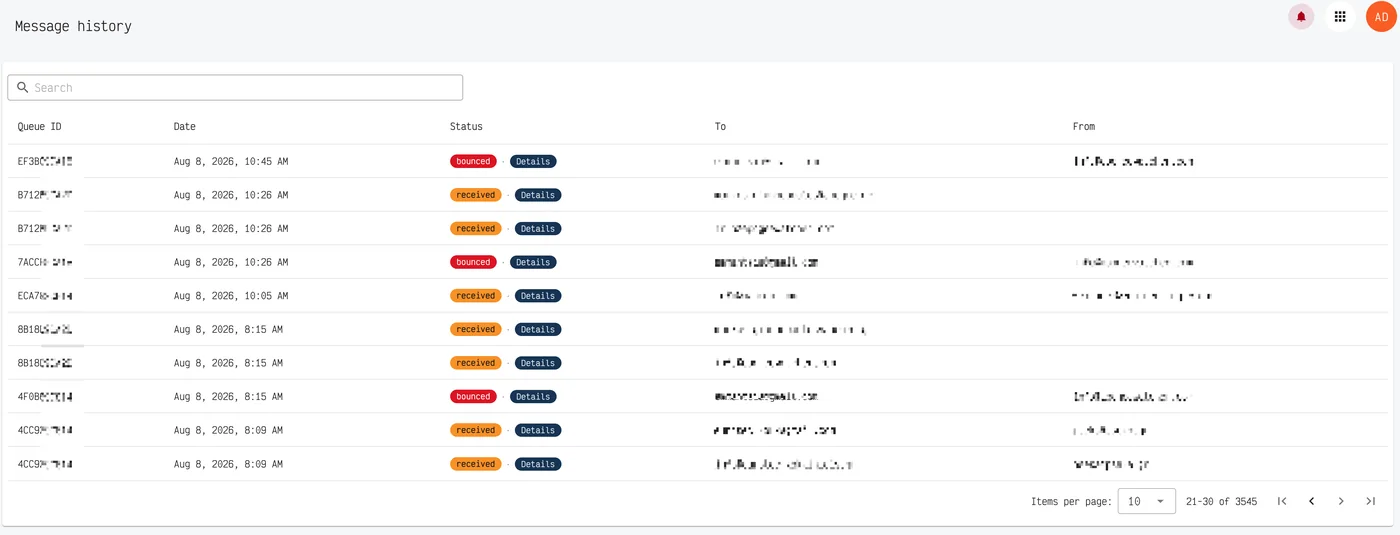
Extend basic message history with delivery-path and next-hop analysis, recipient-side failure context and one-click diagnostic detail for individual transactions.
Evaluate SPF, DKIM and DMARC in the context of the actual failed delivery, explain the likely cause, and provide concrete corrective actions that can be rechecked after configuration changes.
// 04
MailOps lives inside Modoboa — the same admin your team already uses. These views show how server health, mailbox estate and delivery diagnostics surface as concrete operator screens.
// 01
CPU, memory, disk and network at a glance, plus live status for Postfix, Dovecot, Rspamd and the rest of the stack — without leaving Modoboa for a separate monitoring tool.
// 02
Domain and account counts, used space, traffic and migration totals in one panel — with stale mailbox reporting based on size and last login so idle storage is visible.
// 03
Each domain row shows account count and disk space used at a glance, plus custom tags for operational context — so estate size and labeling sit in the same table where domains are managed.

// 04
Account lists enriched with size, message counts and migrated markers — so storage analytics and IMAP migration progress are readable without exporting reports.
// 05
Searchable delivery trail with status, sender, recipient and subject — the starting point for deeper tracing when a message fails and vanilla status is not enough.
// 06
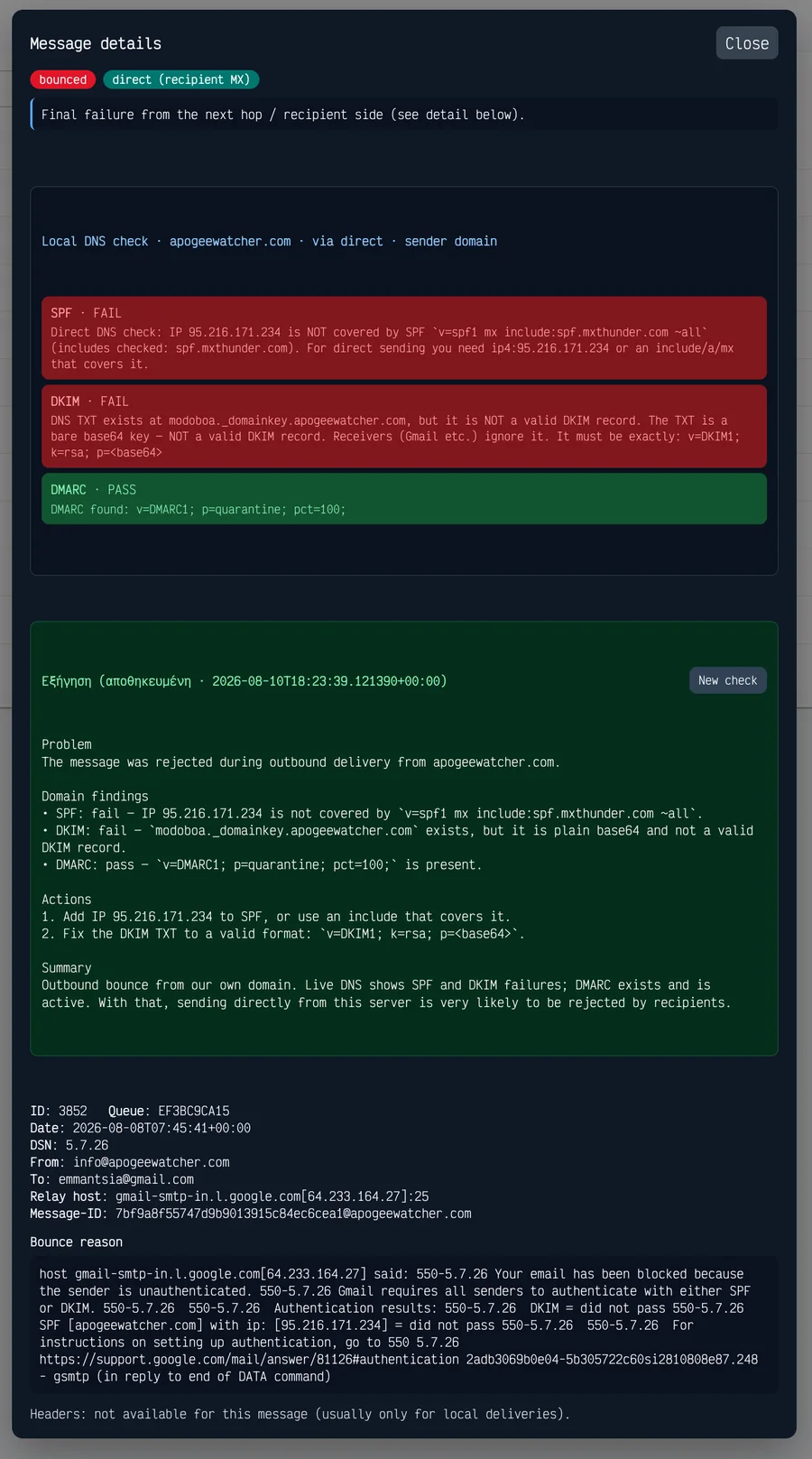
Failed deliveries open into contextual DNS authentication cards and SMTP failure analysis — with remediation guidance tied to the actual message, not a generic checklist.
// 07
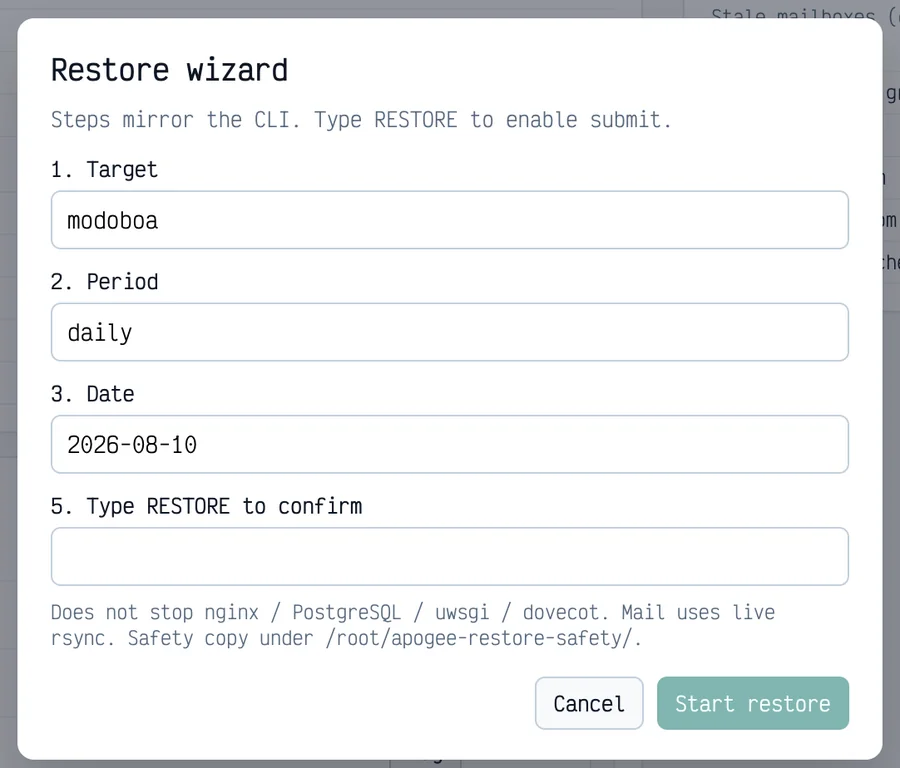
Guided restore with stream, period and date selection — the same ops maturity as CLI restore flows, exposed as a Modoboa-native wizard for safer recovery.
// 05
Modoboa already provides strong mail administration capabilities, including domains and accounts, quotas, mail traffic statistics, audit logs, a message log, DNS authentication checks and IMAP migration. MailOps is designed to complement these features rather than duplicate them.
The difference is operational context and presentation: MailOps combines information from the server, mailbox store, message path and DNS configuration into views that answer common administrator questions directly.
// 06
Two clear paths: a permanent License only purchase for an existing Modoboa installation, or a Complete new-server deployment that installs Modoboa and MailOps for you — with the €75 license included.
€75€50
Launch discount, first 50 orders
Permanent license for Apogee MailOps v1.x on one Modoboa server/installation. You bring your own AI API key for AI-powered features.
Included
Not included
€375€250
Launch discount, first 50 orders
A complete initial deployment of a new Modoboa mail server with Apogee MailOps — MailOps v1 license included (€75 value).
Included
Not included
APOGEE MAILOPS FOR MODOBOA | Apogee Information Systems